Newsletter plugin
- Quick start
- Writing newsletters
- Scheduling
- Subscribers & forms
- Welcome & lead magnet
- Pro plugin
- Templates
- AI Agents
General
Looking for the Facebook posting plugin? See its docs →
This page mentions tools we use ourselves. Some links are affiliate links — if you sign up after clicking through, we earn a small commission, at no extra cost to you. See the full list of tools we use.
AI Agents
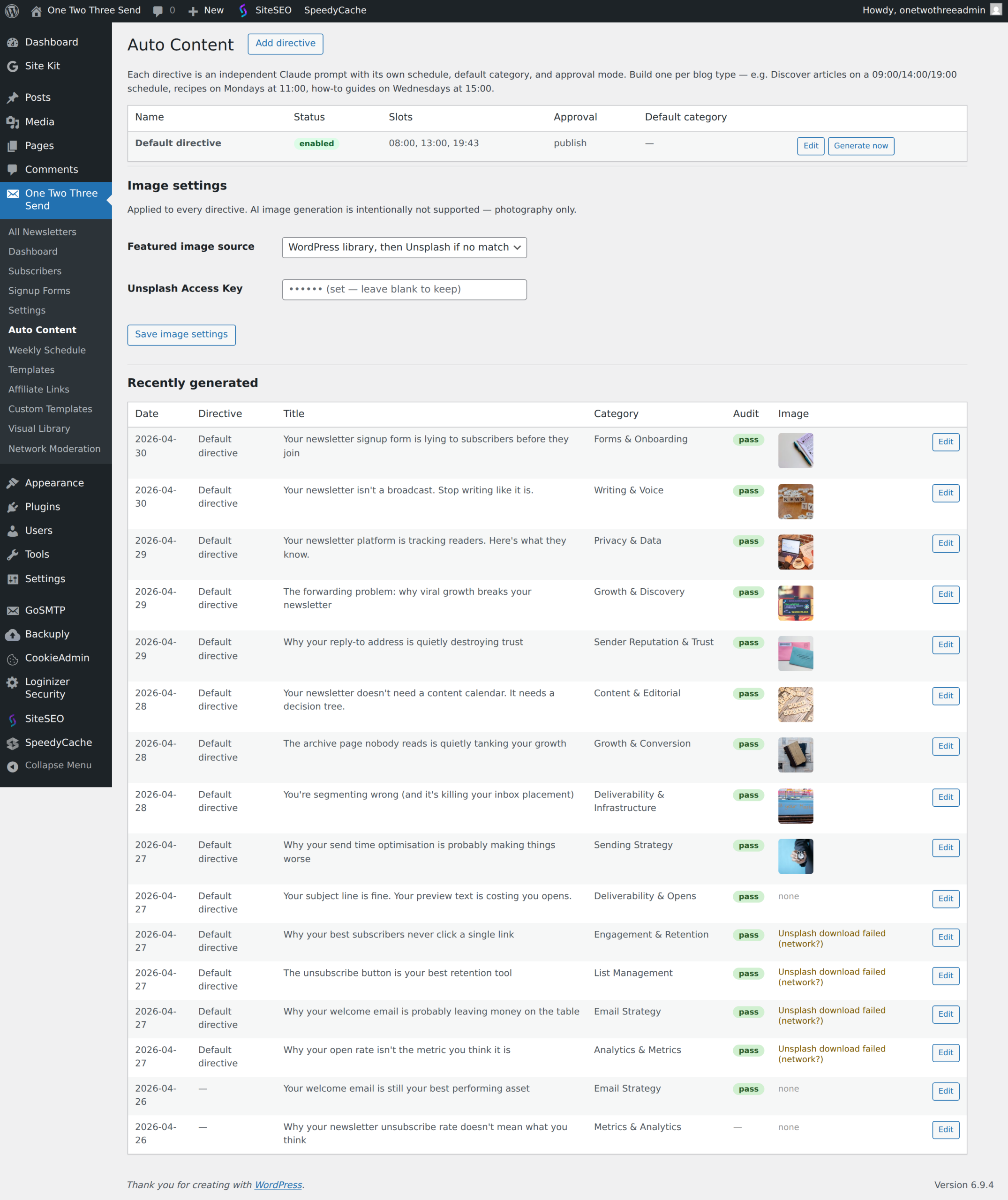
Pro plugin feature (formerly Auto Content). A directive-driven blog post generator: write a Claude prompt once, pick daily time slots, and the plugin drafts (or publishes) SEO-friendly articles on autopilot. Internal tracker prevents repeated topics. Every draft runs through the editor pass before you see it.
Where to find it
One Two Three Send → AI Agents. The menu entry only appears once the pro plugin is active.
The directive
The single most important field. It is the full Claude prompt used for every generation. A starter is pre-filled based on your site name and tagline — edit it heavily.
A good directive specifies
- Topic categories Claude can pick from (a curated list of beats your site covers)
- Headline rules (length, voice, what to avoid)
- Article rules (word count, structure, allowed HTML tags, voice)
- Banned content (anything off-brand or risky — internal codenames, competitor mentions, certain phrasings)
- Output format — a strict JSON schema. The plugin parses these keys:
title,slug,excerpt,body_html,category
The starter directive in the box already includes the JSON schema rules — keep them. Edit the topic and voice sections to match your site.
Daily time slots
Comma-separated HH:MM in your site timezone. 09:00, 14:00, 19:00 generates three articles per day at those times. One slot per day fires once per day — the transient guard stops the same slot double-firing.
Leave the field empty to disable scheduled generation. You can still use the Generate now button below.
Approval mode
- Save as draft, email me to review (default) — every generated article lands in Posts as a draft. The site admin gets an email with the title and an Edit link. Strongly recommended for the first month while you tune the directive.
- Publish automatically — articles go live immediately. Use only after the directive is dialled in and several drafts in a row read well.
Default category & author
The category Claude returns is added on top of the default category if both are set. Author is who the post is attributed to in WP — pick a real user (administrator, editor, or author role).
Run editor pass
On by default. After Claude generates the article, the editor pass runs a second Claude call with a strict JSON find/replace rubric. It auto-applies every confident edit to the draft (grammar, tone fixes, redundancy, cliché swaps, duplicate CTA removal). Judgment-call flags are stored on the post for you to see.
Anti-duplication tracker
The plugin keeps the most recent 50 generated articles (date, title, category) in an option. Every Claude call sends this list as RECENT_ARTICLES context with instructions not to repeat category or close topics. Without this, every generation tends to drift toward the same handful of “obvious” topics.
Recommended first-use flow
- Leave defaults for everything except the directive.
- Edit the directive — set your topic categories, voice rules, banned content.
- Click Generate now. Watch a draft appear in Posts.
- Read the draft. If voice or focus is off, edit the directive to be more specific. Repeat.
- Once two or three manual generations look good, set time slots, leave Approval = draft.
- Watch a week of drafts. If they consistently work, switch Approval to publish.
How the image picker chooses photos for AI Agents posts
From Pro 2.14.129, the image picker walks three sources in order: your own WordPress media library, Wikimedia Commons (free, CC-licensed), then Unsplash (free, requires API key). It stops at the first source that returns a confident match for the article’s subject.
How subject matching works
The picker extracts a “subject anchor” from the article title — the longest meaningful token. For “Castello di Sammezzano: Italy’s Moorish Palace Hidden in Tuscan Hills”, the anchor is Sammezzano. That anchor is preserved as the lead keyword regardless of stopword filtering, and any candidate image must mention it somewhere in its filename, credit, or artist field. Generic noun matches like “castle” or “Italy” alone are not enough — the picker requires the distinctive name.
On Wikimedia Commons, the picker first tries a category-anchored search (Category:{titlecased subject}) before falling back to free-text search. Many named subjects — castles, museums, churches, archaeological sites — have their own Commons categories full of curated photos of THAT specific subject. Category-anchored search guarantees you get a Sammezzano photo when the article is about Sammezzano, instead of any old Italian castle.
When the picker returns no image
If no source returns a candidate that mentions the subject anchor, the picker returns no image — by design. A blank thumbnail is better than a confidently wrong photo of a different subject. The operator can attach a featured image manually from the post-edit screen.
Prior to 2.14.129, the picker had a “single-word fallback” that turned a failed multi-word search into a generic single-word one (e.g. “castello sammezzano italy moorish” with no hits → “castello” alone → first random castle photo). That fallback produced consistently wrong-subject images and has been removed. If you want it back, filter otts_pro_image_picker_single_word_fallback to true.
Cost
Each article generation runs through the Claude API and (if editor pass is on) a second Claude call. Cost is per-token via your console.anthropic.com account (don’t have one yet?) — typically ~$0.05–0.20 per article depending on length. Three articles per day on the default settings is roughly $0.15–0.60 per day.
Next: Privacy & data.
Plugin screenshots
Vision-checked images
When the image source can’t find an exact match by keyword, the agent sends the top candidate photos (Wikimedia Commons + Unsplash) to Claude and picks the one that actually depicts your subject — so a post about Europa-Park gets Europa-Park, not a look-alike. It works for single landmarks and “top 10” listicles alike. On by default; disable per-site with the otts_pro_image_vision_verify filter.
No manual priming
A new or edited directive automatically reads your site’s recent published posts and avoids repeating subjects already covered — you no longer have to seed it with a “don’t write about X” list.
Daily scheduling
A directive with a single time slot (for example 13:30) publishes one post per day at that time. Set the site timezone first (Settings → General) — the slot is interpreted in site-local time.